
Building an AI Comparison Tool with Laravel and Livewire: Complete Development Guide
Learn how we built a powerful side-by-side AI model benchmarking platform using Laravel 12 and Livewire 3, enabling real-time performance comparison across multiple AI providers with detailed metrics and cost analysis.
Super Admin
Author
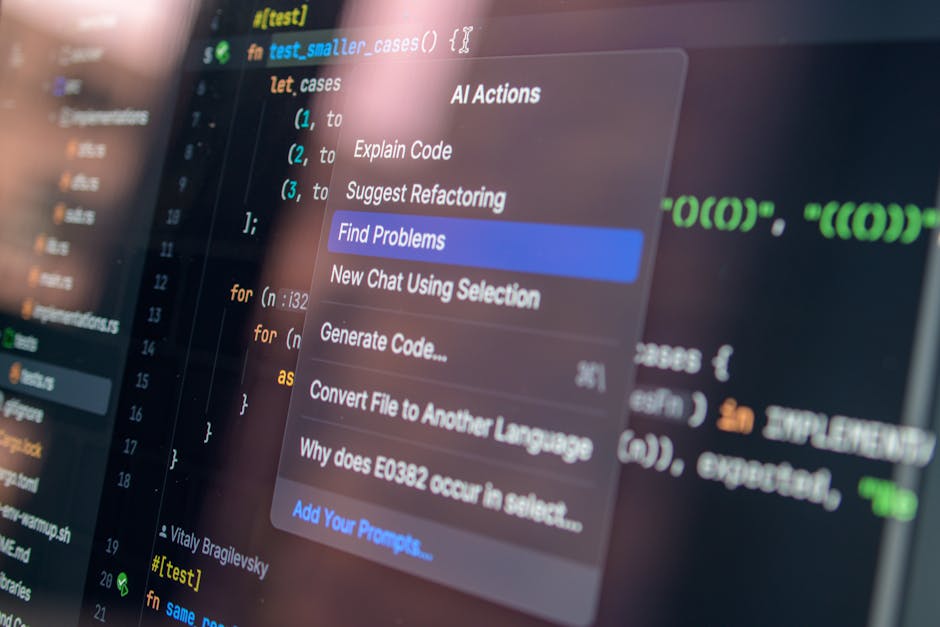
How We Built a Side-by-Side AI Model Benchmarking Platform
Choosing the right AI model for a project isn't straightforward. GPT-4 Turbo, Claude Sonnet, Claude Haiku — each has different strengths, speeds, and costs. We built an AI Comparison Tool inside DynamoAiGen that lets users send the same prompt to multiple models simultaneously and compare the results with real performance metrics.
🚨 The Problem
Evaluating AI models typically means switching between provider dashboards, copying prompts manually, and trying to remember which response was better. There's no easy way to see how models stack up on the same task with objective data — response time, token usage, and cost — in one place.
🏗️ Architecture Overview
The tool is built on Laravel 12, Livewire 3, and Alpine.js, following the same stack as the rest of DynamoAiGen. Three database tables underpin the module:
- ai_model_rates stores per-model pricing (input and output rates per 1K tokens), provider name, and an active toggle.
- ai_comparisons represents a comparison session — the prompt, system prompt, credit budget, and overall status.
- ai_comparison_runs stores each individual model's response, token counts, duration, estimated cost, and error details.
A single AiComparisonTool.php Livewire component handles the full lifecycle: listing past comparisons, creating new ones, viewing results, retesting, and displaying statistics. The Blade view renders a responsive side-by-side canvas where each model gets its own card.
⚡ How a Comparison Runs
-
1
The user enters a prompt, optionally a system prompt, selects two or more models, and sets a credit budget.
-
2
The Livewire component validates the input, creates an AiComparison record, then dispatches a RunAiComparisonJob for each selected model — all in parallel.
-
3
Each job calls AiProviderService, which routes the request to the correct provider API (Anthropic or OpenAI). The service tracks prompt tokens, completion tokens, and elapsed time.
-
4
On completion, the job calculates cost using the rates from ai_model_rates, stores the full response, and marks the run as completed (or failed with an error message).
-
5
Once all runs finish, the parent comparison record flips to completed. The frontend polls every two seconds while jobs are in flight. As soon as results land, the UI updates — no page refresh needed.
🎨 The Results Canvas
Each model response is displayed in its own card with a provider icon (C for Claude, G for GPT), a status indicator, and the rendered output. The tool handles three rendering modes:
- Full HTML documents are shown in sandboxed iframes
- HTML fragments are sanitized and rendered inline
- Plain text is displayed as-is
Below each response, a stats footer shows duration (e.g., "2.34s"), total tokens, input/output token breakdown, and estimated cost. Users can toggle between the rendered view and raw source to inspect the actual markup a model produced.
🔄 Iteration and Retesting
A comparison isn't a one-shot affair. The Retest button re-runs all models with the same prompt, creating a new iteration (run #2, #3, etc.) and deducting credits accordingly. The Edit Prompt feature lets users tweak the prompt and re-run, preserving the history of previous iterations. A run selector lets users flip between iterations to see how results vary.
📊 Statistics and Analytics
The Stats tab aggregates data across all iterations: average, minimum, and maximum duration per model; token usage trends; cost comparison; and tokens-per-second throughput. This makes it straightforward to spot which model is consistently fastest, cheapest, or most verbose.
💳 Credit System
Each comparison starts with a user-defined credit budget. As runs complete, their estimated cost is deducted. A color-coded progress bar (green → amber → red) shows remaining credits at a glance, preventing runaway spending.
🤖 AI-Powered Rate Validation
Model pricing changes frequently. Rather than manually checking provider websites, the tool includes a rate validation feature that uses AI itself to analyze the stored pricing data and suggest corrections — a practical example of using the tool to maintain itself.
⚙️ Technical Decisions
🚀 Jobs over synchronous calls
AI API responses can take 10+ seconds. Running them as queued jobs with a 180-second timeout and two retries keeps the UI responsive and handles transient failures gracefully.
🏗️ Provider abstraction
AiProviderService encapsulates all provider-specific logic. Adding a new provider means adding one method — the comparison engine doesn't need to change.
📡 Polling over WebSockets
For a tool where results arrive in seconds, 2-second polling is simpler and sufficient. No Reverb/Pusher configuration is required for this module.
🛡️ HTML sanitization
AI models often return HTML. The rendering pipeline sanitizes fragments to prevent XSS while preserving formatting for a faithful preview.
✨ What It Looks Like in Practice
A typical workflow: a developer pastes a coding prompt, selects Claude Sonnet and GPT-4 Turbo, and hits Compare. Fifteen seconds later, both responses appear side by side.
Claude responded in 3.1 seconds using 1,247 tokens at $0.0089.
GPT-4 Turbo took 5.8 seconds, used 1,583 tokens at $0.0142.
The developer clicks Retest twice more to check consistency, reviews the stats tab, and makes an informed decision.
The entire module — Livewire component, Blade view, background job, service layer, and three models — comes in at roughly 2,000 lines of code. It ships as part of the CMS admin panel at /admin/cms/ai-comparison, protected by the existing RBAC system.
Written by
Super Admin
Author at BuildMyAiStoreNow
Related Articles

GPT 5.2 vs Claude Optus 4.6: Ultimate AI Showdown for Laravel Livewire & TailwindCSS Development
Discover which AI powerhouse reigns supreme for modern web development. Complete performance analysis, pricing breakdown, and real-world Laravel Livewire benchm...
Mar 10, 2026
From Claude Optus Origins to E-Commerce Revolution: How AI Coding is Reshaping Digital Commerce Search
Discover how Claude Optus's unique architecture is transforming VSCode development workflows and revolutionizing e-commerce search capabilities. The future of o...
Mar 10, 2026

Claude AI's Revolutionary Impact on VSCode Development and the Future of Intelligent Programming
Discover how Claude AI is transforming VSCode development workflows and reshaping the future of programming, e-commerce, and search technologies with unpreceden...
Mar 10, 2026

How AI Became the Future of Tech in 2026: The Year Everything Changed
From Claude's coding revolution to AI-powered e-commerce stores, 2026 became the pivotal year when artificial intelligence transformed from a promising technolo...
Mar 12, 2026